
Currently Empty: ₹0.00

Introduction: Why Your Workstation Chair Matters More Than You Think
In today’s work culture, most of us spend long hours sitting at a desk—whether it’s in an office, a home workspace, or a co-working environment. While we often focus on laptops, monitors, and desks, one important element is usually ignored: the chair we sit on every day.
A workstation chair is not just another piece of furniture. It directly affects how your body feels, how long you can focus, and how productive your workday becomes. An uncomfortable or poorly designed chair can slowly lead to back pain, neck strain, tiredness, and poor posture—even if your work setup looks perfect.
That’s why choosing the right workstation chair is essential. A well-designed chair supports your body, keeps you comfortable for long hours, and helps you work efficiently without constant discomfort.
In this blog, we’ll explore:
- Common problems people face with regular office chairs
- What makes a good workstation chair
- How the right chair can improve comfort and productivity
- Why our workstation chairs stand out compared to others
The Real Problem No One Talks About at Work
Let’s be honest.
Most people don’t realize their chair is the reason they feel:
- Tired before lunch
- Back pain by evening
- Neck stiffness after meetings
- Low focus during work hours
We often blame long working hours, screens, or stress. But many times, the real issue is the chair we sit on all day.
A workstation chair isn’t something you notice when it’s good—but you definitely feel it when it’s bad. Poor support forces your body to adjust unnaturally, leading to discomfort that builds up over time.
Why a Good Workstation Chair Helps You Work Smarter
A good workstation chair does one simple thing:
It supports your body so you can focus on your work.
When your chair fits you properly:
- Your back stays supported
- Your shoulders feel relaxed
- Your posture improves naturally
- You feel less tired at the end of the day
This leads to:
- Better concentration
- Fewer breaks due to discomfort
- More energy throughout the workday
Working smarter isn’t about pushing harder—it’s about working comfortably.
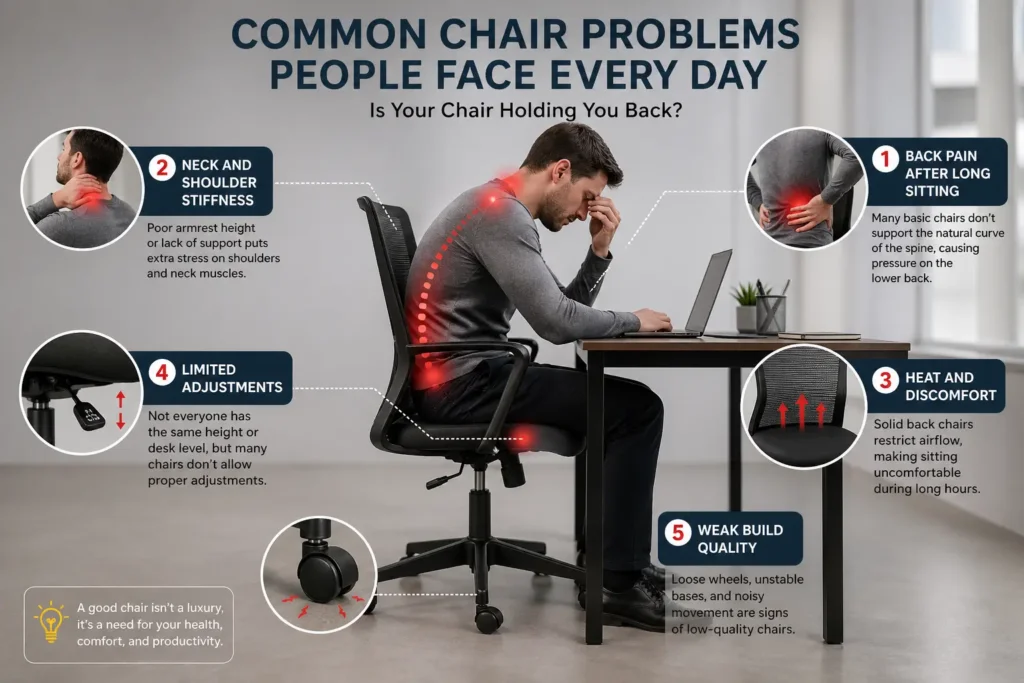
Common Chair Problems People Face Every Day
1. Back Pain After Long Sitting
Many basic chairs don’t support the natural curve of the spine, causing pressure on the lower back.
2. Neck and Shoulder Stiffness
Poor armrest height or lack of support puts extra stress on shoulders and neck muscles.
3. Heat and Discomfort
Solid back chairs restrict airflow, making sitting uncomfortable during long hours.
4. Limited Adjustments
Not everyone has the same height or desk level, but many chairs don’t allow proper adjustments.
5. Weak Build Quality
Loose wheels, unstable bases, and noisy movement are signs of low-quality chairs.
What Makes a Good Workstation Chair?
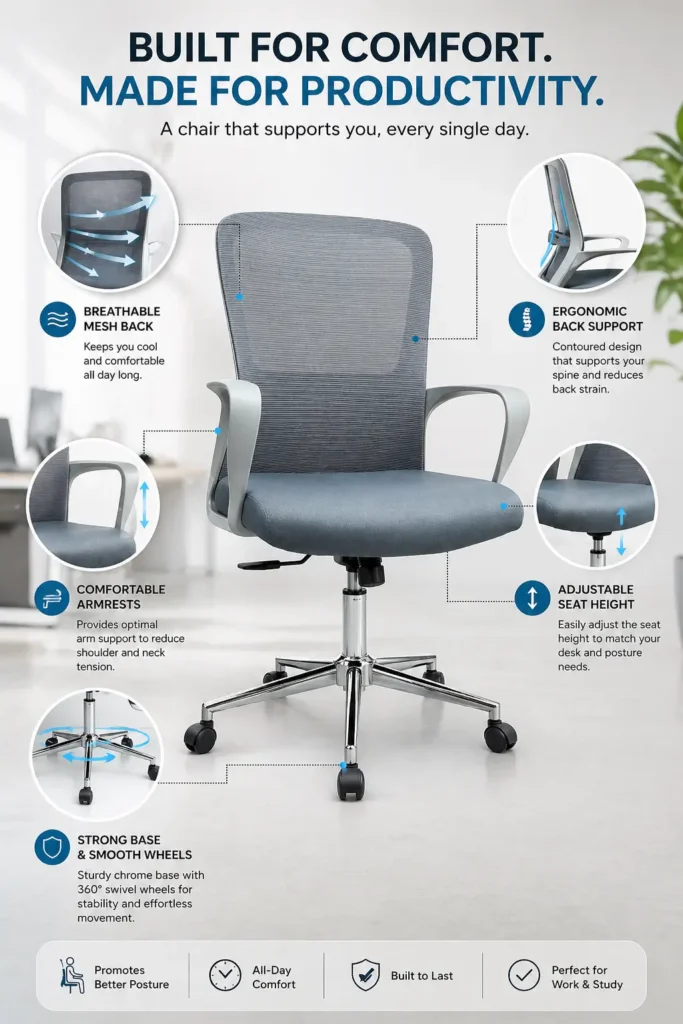
A good workstation chair focuses on comfort, support, and daily usability.
Key features include:
- Ergonomic back support
- Breathable materials
- Adjustable seat height
- Comfortable armrests
- Strong base with smooth wheels
How Our Workstation Chairs Solve These Problems
✔ Ergonomic Mesh Back Support
The mesh back supports your spine while allowing airflow, keeping you comfortable throughout the day.
✔ Natural Lumbar Support
The backrest follows the natural shape of your back, reducing strain and improving posture.
✔ Comfortable Cushioned Seat
The seat provides balanced cushioning — firm enough for support, soft enough for long sitting hours.
✔ Strong and Stable Base
A solid base ensures balance, safety, and durability for daily use.
✔ Smooth Rolling Wheels
Move easily between workstations without effort or floor damage.
✔ Easy Adjustments
Height and tilt adjustments help users customise the chair according to their comfort.
How Our Workstation Chairs Compare to Regular Chairs
| Feature | Regular Office Chair | Our Workstation Chair |
| Back Support | Basic | Ergonomic mesh |
| Airflow | Limited | Excellent |
| Comfort | Short-term | Long-hour comfort |
| Build Quality | Average | Strong & durable |
| Adjustability | Minimal | Flexible |
Suitable for All Workspaces
These workstation chairs are ideal for:
- Corporate offices
- Home offices
- Co-working spaces
- Study rooms
- Startup environments
They fit modern interiors while delivering practical comfort.
Why Investing in the Right Chair Is Worth It
A good workstation chair:
- Reduces long-term posture issues
- Improves daily comfort
- Supports productivity
- Helps you feel better after work
It’s not just a chair—it’s part of your everyday well-being.
Conclusion: Sit Better to Work Better
Your workstation chair plays a bigger role in your workday than you might think. When your chair supports you properly, working feels easier, more comfortable, and more productive.
Our workstation chairs are designed to solve real sitting problems and support long hours of focused work—without compromising on comfort or design.
Working smarter starts with sitting smarter.
⭐ Frequently Asked Questions (FAQs)
1. Why is a workstation chair important for daily work?
A workstation chair supports your back, posture, and sitting position during long working hours. Without proper support, people often experience back pain, neck strain, and fatigue, even if their work isn’t physically demanding
2. How is a workstation chair different from a regular office chair?
A workstation chair is designed for long sitting hours. It offers better back support, proper seat cushioning, and stability, while regular chairs usually focus only on appearance and short-term comfort.
3. Can a good workstation chair really reduce back pain?
Yes. A well-designed workstation chair supports the natural curve of your spine and helps maintain proper posture, which reduces pressure on the lower back and shoulders over time.
4. How many hours can I comfortably sit on a workstation chair?
A quality workstation chair is designed for 6 to 8 hours or more of daily use, provided you sit correctly and take short breaks in between.
5. Is a mesh back better than a solid back for workstation chairs?
Mesh backs are often preferred because they:
- Allow airflow
- Reduce sweating
- Provide flexible back support
They work especially well for long working hours and warm environments.
6. Are adjustable features really necessary?
Yes. Adjustable height and armrests help align your body properly with your desk and screen, reducing strain on your neck, shoulders, and arms.
7. Is a workstation chair suitable for work-from-home setups?
Absolutely. Work-from-home users often sit for long hours without realizing it. A workstation chair helps maintain comfort and productivity throughout the day.
8. How do I know if a workstation chair is right for me?
If the chair:
- Feels comfortable after several hours
- Supports your lower back
- Keeps your feet flat on the floor
- Doesn’t make you shift constantly
Then it’s doing its job correctly.
9. Are workstation chairs suitable for office use as well?
Yes. Workstation chairs are ideal for offices, coworking spaces, and corporate setups because they are built for durability, daily use, and employee comfort.
10. What should I avoid when choosing a workstation chair?
Avoid:
- Choosing only based on looks
- Very soft or very hard seats
- Chairs without proper back support
- Lightweight chairs for long-hour use
Comfort and support should always come first.

